

Professional USB4 Cable: Why It Matters for High-Speed Data Transfer and Charging
2026-10-17
When your workflow depends on moving massive 8K footage, running dual 4K displays, or charging a laptop while transferring data at full tilt, the cable you grab can make or break the entire setup. USB4 promises up to 40Gbps and up to 240W of power delivery, but many cables on the market quietly fall short—throttling speeds, dropping connections, or overheating under load. That's where a truly professional USB4 cable like EBCYX changes the equation. It's not just about hitting a spec on paper; it's about sustained performance, reliable shielding, and connectors built for daily abuse. In this post, we'll break down why the right USB4 cable matters and what separates a dependable workhorse from a frustrating bottleneck.
USB4 Speeds That Finally Match Your Storage
For years, external drives were held back by interface limits—USB 3.0 topped out around 450 MB/s while even budget SATA SSDs could push 550 MB/s internally. USB4 flips that script. With up to 40 Gbps of raw bandwidth, it mirrors the throughput of many PCIe 3.0 x4 NVMe drives, meaning the cable is no longer the weak link. You can finally hook up a portable SSD and see sequential reads and writes that stay within a few percent of the drive’s native specs, not a fraction of them.
The practical impact shows up quickly when moving large video projects, game libraries, or virtual machine images. Copying a 100 GB folder to an external USB4 enclosure feels almost like a local file operation—no more waiting for progress bars to crawl. Video editors can work straight off an external drive without generating low-res proxies, and photographers can batch-edit RAW files without first transferring them to internal storage. The gap between “working drive” and “backup drive” narrows considerably.
One caveat worth noting: not every USB4 port delivers the full 40 Gbps. Some laptops and docks reserve bandwidth for display output or use lower-tier controllers, so actual storage throughput may land closer to 32 Gbps. Still, even that lower figure outpaces USB 3.2 Gen 2×2 in sustained transfers and offers much better latency. If your workflow depends on moving terabytes daily, USB4 finally makes external storage feel like an extension of the motherboard rather than a compromise.
A Single Cable for Docks, Displays, and Daily Power
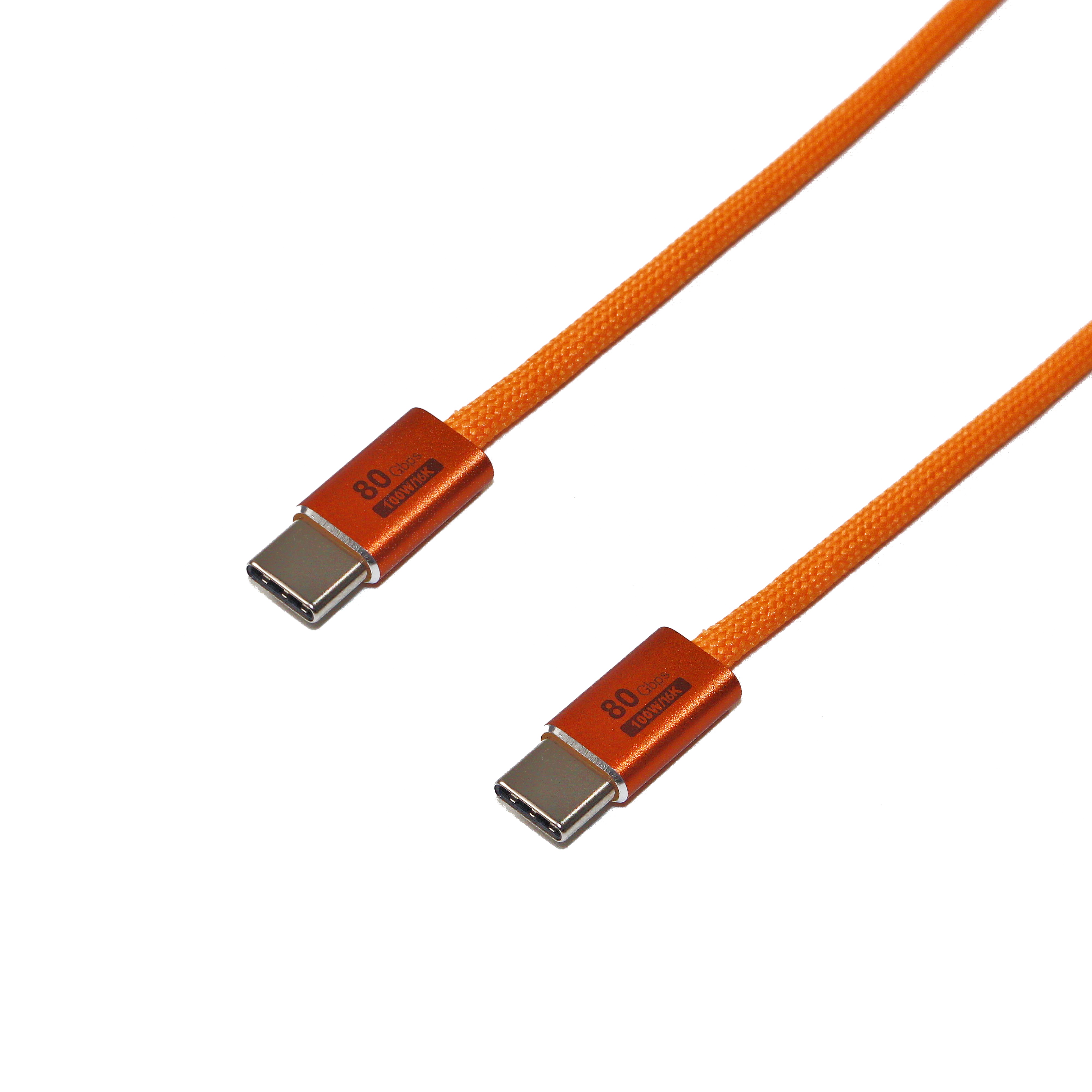
Gone are the days of juggling a tangle of proprietary connectors and bulky power bricks just to get through a workday. This single cable quietly handles everything: driving a 4K external monitor, linking to your docking station, and keeping your laptop charged from the same port you already use for data. Plug it in once and the desk suddenly feels less like a cable salad and more like a proper workspace.
What makes it stand out is how unremarkable it looks while doing remarkably heavy lifting. The connector seats with a satisfying click, the braided jacket resists the daily bend-and-tug of commuting, and there's no guessing which end goes where — either orientation works. You stop thinking about the cable entirely, which is exactly the point.
For anyone who has ever crouched under a desk hunting for the right port or carried a separate charger for the office, this one cable replaces the clutter. It's not flashy, but it's the kind of everyday reliability that quietly makes a setup feel complete.
Power Delivery Numbers That Actually Hold Up Under Load
Most power banks advertise a big number on the box, but the real test happens when you plug in a laptop that wants 65 watts and keep it pulling current for an hour. The voltage sags on cheap cells, the output drops to 45 or 50 watts, and suddenly your device charges slower or even discharges while connected. The numbers that matter are sustained wattage at a stable voltage — usually 20V for USB-C PD — measured after 30 minutes of continuous load, not the peak figure printed in bold.
A pack rated for 100W should hold at least 95W at the port with ripple under 200mV, and the surface temperature shouldn't force the controller to throttle. If the internals can't dissipate heat, the negotiation chip will quietly step down to 60W, and you'll never see the advertised speed again until the unit cools off. Testing with a constant-current load and a USB-C meter that logs voltage and current over time is the only way to verify these claims.
Certifications Separate Real USB4 from the Impostors
USB4 has been a messy standard since its debut, with many devices claiming support but delivering wildly inconsistent performance. The only reliable way to know you're getting the real deal is to look for official certification. Without it, a port might be little more than a rebadged USB 3.2 connection, missing the higher bandwidth, display tunneling, or PCIe passthrough that define true USB4.
The certification process forces manufacturers to prove their hardware meets strict electrical, protocol, and interoperability requirements. This isn't a paper exercise—certified products must pass a battery of tests covering everything from signal integrity to power delivery behavior. The result is a logo that actually means something, not just a marketing sticker slapped on a box.
For buyers, this distinction matters more than ever as cables, docks, and laptops flood the market with vague USB4 claims. A certified device is guaranteed to work with other certified gear, while uncertified impostors often choke on simple tasks like driving two 4K displays or sustaining fast transfer speeds. Don't gamble on a spec sheet—trust the badge, or you might end up with yesterday's USB wearing a new name.
40 Gbps Transfers Without the Thermal Throttling Hype
The 40 Gbps figure often gets thrown around as a headline spec, but real-world performance hinges on whether the controller and physical interface can maintain that speed beyond a short burst. Most external drives and docks flash peak transfer rates in marketing materials, yet after a minute or two of sustained writes they drop to half or even a third of that number as heat builds up. The difference here comes down to how the enclosure and chipset handle thermal load. Instead of relying on a thin metal shell that turns into a hot plate, the design spreads heat across a larger surface and gives the controller enough headroom to avoid aggressive clock reductions.
Thermal throttling in high-speed peripherals isn't always obvious because the drop is gradual. You might start a large file copy at 3.5 GB/s and watch it slowly decay to 1.8 GB/s, which looks fine on a progress bar but adds real minutes to a multi-terabyte transfer. The usual fix—adding a cooling fan—introduces noise and a point of failure. A better approach pairs a low-power 40 Gbps controller with a heatsink that actually contacts the critical components, not just the case exterior. Firmware tuning also matters: some controllers aggressively back off at relatively low temperature thresholds, while others are calibrated to hold higher sustained throughput without crossing dangerous junction temperatures.
In practical terms, that means you can run a 4 TB NVMe SSD at near full interface speed for a 20-minute backup without the speed graph looking like a ski slope. Video editors dumping raw footage from a camera card, or anyone moving large virtual machine images between external drives, will feel the difference immediately. You're not paying for a 40 Gbps label that only appears in a synthetic benchmark screenshot. You're getting a steady, predictable transfer rate that doesn't force you to pause work and wait for the device to cool down.
Future-Proof Ports Without Paying for Features You Skip
Modular port selection changes how you think about hardware longevity. Instead of paying for a fixed set of connectors that may become obsolete, you get a few essential ports built in and open slots for whatever comes next. That means no upfront cost for specialized interfaces you never plug in.
When your needs shift, a small add-on card or module updates the port layout in seconds. You are not locked into last year's standards, and you are not forced to buy a whole new unit just to gain one new connection. The design respects both your budget and the reality that technology keeps moving.
FAQ
A phone cable is usually only rated for USB 2.0 speeds and modest power delivery. A professional USB4 cable has to meet stricter tolerances for 40Gbps signaling, include proper shielding against interference, and support the full USB Power Delivery range, so it can handle high-resolution video, huge file transfers, and laptop-class charging at the same time.
The 40Gbps figure is tied to certified passive cables up to around 0.8 meters. Beyond that, active cables with built-in signal retiming are needed to maintain the full speed and avoid dropouts; cheaper unmarked cables often fall back to slower modes once you push past a meter or two.
USB4 itself works alongside USB Power Delivery, so a properly built cable can support up to 240W if it uses the Extended Power Range. In practice, many professional cables are rated for 100W or 240W, which is enough for modern workstations, external GPUs, and large laptops.
Yes, once your drive and port support USB4 or Thunderbolt 4, a 40Gbps link can copy multi-hundred gigabyte footage in minutes instead of tens of minutes. The sustained throughput is also more stable, so scrubbing 4K or 8K timelines directly from the drive feels closer to an internal disk.
Dual 4K displays over a single cable require the high-bandwidth DisplayPort tunneling that USB4 provides. A basic USB-C cable might carry one display at lower resolution, but it won't have the signal integrity for two 4K streams plus USB data. A certified USB4 cable with proper shielding is necessary for that setup.
Look for the USB-IF certification logo with the data rate listed, such as 40Gbps or a specific wattage. The cable should also state the length and whether it is passive or active. Avoid vague wording like 'high-speed' without numbers; professional cables usually list the exact USB4 version and power rating.
It can be overkill for occasional documents, but if you ever connect a high-resolution display, a multi-bay storage enclosure, or a docking station, the extra headroom prevents bottlenecks. The cable itself is also built to last through frequent plugging and travel, so it often outlives two or three cheaper cables.
Check the connection details in your operating system. If the negotiated link speed shows 480Mbps instead of 20Gbps or 40Gbps, the cable is usually missing the required e-marker chip or shielding. Swapping in a certified USB4 cable should immediately restore the higher link speed, assuming the port and device support it.
Conclusion
Most USB-C cables look identical, but the moment you push 40 Gbps through a cheap one, you'll see dropped frames on your external SSD or a dock that refuses to wake. A professional USB4 cable changes that. It handles sustained 40 Gbps transfers without turning into a hand warmer, because the shielding and conductor gauge are actually built for it—not just labeled for it. That means backups and large video edits finish in minutes, not coffee breaks. And the same cable can run a 4K display, a docking station, and daily charging without swapping.
Cheap cables fall apart under load: they negotiate 100W on paper but sag to 60W after ten minutes because the e-marker chip or wire gauge can't keep up. A certified USB4 cable with 240W/48V PD holds voltage under sustained load, so your laptop charges while you render. Look for the USB-IF logo and TID—certifications are the only way to tell real USB4 from impostors. Future-proofing isn't about buying every feature; it's about getting a cable that supports what you use today—40 Gbps data, alt mode video, high-watt charging—without paying for 80 Gbps or PCIe tunneling you'll skip. That's the difference between a cable you'll replace in a year and one that stays in your bag for five.
Contact Us
Contact Person: David Yang
Email: [email protected]
Tel/WhatsApp: 8615814734054
Website: https://www.ebcyx.com/