

Power Distribution Box: The Ultimate Guide to Choosing the Best One for Your Needs
2026-01-09
Choosing the right power distribution box can feel overwhelming—especially with so many options on the market. At Lugao, we believe in empowering you with the knowledge to make informed decisions. This ultimate guide cuts through the noise, offering a clear, practical roadmap tailored to your unique needs. Whether you're upgrading an industrial setup or optimizing a home office, we'll explore key features, safety considerations, and innovative solutions that set top performers apart. Ready to find the perfect match? Let's dive in and discover how the right choice can transform your power management.
Understanding What a Power Distribution Box Does
A power distribution box acts as a central hub for managing electricity flow from a main source to multiple connected devices or circuits. It plays a critical role in distributing power safely and efficiently, preventing overloads and ensuring that each component receives the appropriate voltage and current. Often found in industrial setups, large-scale events, or construction sites, it helps organize wiring and simplifies maintenance, making it essential in environments where multiple power demands are present. Without such a box, managing power can become chaotic, leading to potential hazards like short circuits or equipment damage.
Beyond mere distribution, these boxes offer features like circuit breakers, fuses, or surge protectors to safeguard connected equipment from electrical faults. They come in various configurations—portable units for temporary setups or permanent installations integrated into building infrastructure. This versatility allows them to adapt to different needs, whether it's powering tools on a job site or supporting servers in a data center. By centralizing control, users can easily monitor power usage and quickly isolate issues, enhancing overall system reliability and safety.
In practice, using a power distribution box simplifies complex electrical layouts, reducing clutter and improving accessibility for troubleshooting. It's a practical solution that not only supports operational efficiency but also complies with safety standards in many industries. From concerts to manufacturing plants, these boxes ensure that power is delivered where it's needed most, enabling seamless functionality across diverse applications.
Key Features to Look For in a Power Distribution Box
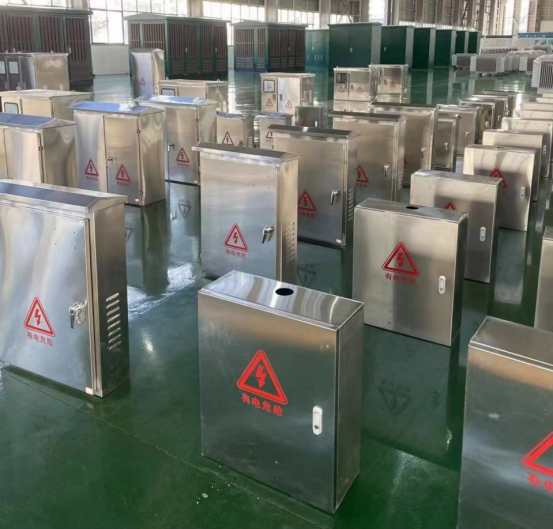
When selecting a power distribution box, the first thing to consider is its build quality and material durability. You'll want a unit that feels robust, with sturdy plastic or metal casing that can withstand daily use and potential impacts. Look for features like reinforced corners and secure lid closures, as these details often indicate a product designed to last. Additionally, check for weather resistance ratings if the box will be used outdoors or in harsh environments, ensuring it can handle moisture and temperature fluctuations without compromising safety.
Another critical aspect is the internal layout and organization. A well-designed power distribution box will have clearly labeled outlets or ports, and ample space for cables to prevent tangling and overheating. Some models offer removable dividers or modular compartments, allowing you to customize the setup based on your equipment needs. This attention to detail not only enhances usability but also reduces the risk of electrical issues by keeping wires tidy and separated. It's worth spending a bit more for a box that prioritizes thoughtful engineering over basic functionality.
Don't overlook safety features, which should include integrated circuit breakers, surge protection, and overcurrent safeguards. These elements are essential for preventing damage to connected devices and minimizing fire hazards. Verify that the box meets relevant safety standards from organizations like UL or CE, as this ensures it's been rigorously tested. Opting for a model with indicator lights or alarms for fault conditions can provide added peace of mind, especially in high-demand settings like workshops or events where power loads can vary unexpectedly.
How to Size a Power Distribution Box for Your Setup
Sizing a power distribution box starts with calculating the total power draw of all the devices in your setup. Grab a notepad and list out each item—from computers and monitors to speakers and lighting rigs. Check their specs for wattage or amperage ratings; if you spot only volts, a quick multiplication with amps (found on labels) gives you the watts. Add everything up, but don’t stop there—factor in any future expansions or peak usage spikes, like a server booting up or a sudden graphics load. This upfront math helps avoid overloads that could trip breakers or worse.
Next, match your total to a PDU’s capacity, keeping a safety margin in mind. Look for boxes rated above your calculated load by at least 20-30%, as this cushions against unexpected draws and extends the unit’s lifespan. Consider the types of outlets too: a mix of NEMA 5-15R for standard gear and locking connectors for high-draw equipment can keep things secure. Don’t forget about form factor—rack-mount models save space in server setups, while portable strips suit studios or temporary rigs. Brands like Tripp Lite or APC offer varied options, so compare specs like surge protection and monitoring features to tailor your pick.
Finally, integrate the PDU thoughtfully into your environment. Place it where cables won’t become trip hazards, and ensure adequate ventilation to prevent overheating. Test it under load before relying on it fully, checking for warm spots or odd noises. With a properly sized box, your setup runs smoother, reducing downtime and fire risks—worth the extra planning for peace of mind.
Comparing Different Types of Power Distribution Boxes
When selecting a power distribution box, the first thing to consider is the application environment. Industrial settings often demand rugged, weatherproof enclosures with high IP ratings, capable of withstanding dust, moisture, and extreme temperatures. In contrast, commercial or residential installations might prioritize sleek designs and compact sizes that blend into interior spaces without drawing attention. Material choice plays a key role here—metal boxes offer durability and shielding against electromagnetic interference, while plastic versions are lighter and resistant to corrosion, making them ideal for humid areas like basements or outdoor patios.
Another critical aspect is the internal configuration and capacity. Some distribution boxes come pre-wired with multiple circuit breakers or fuses, allowing for tailored protection of individual circuits, which is essential in data centers or workshops with sensitive equipment. Others feature modular designs where components like surge protectors, timers, or smart home interfaces can be added or swapped out as needs evolve. It's not just about how many outlets are available; it's about how well the box can adapt to changing power demands, whether you're expanding a home office or upgrading an industrial production line.
Safety and ease of use often distinguish one box from another. Look for models with clear labeling, accessible terminals, and features like locking mechanisms to prevent unauthorized access, especially in public or high-traffic areas. Some advanced options include built-in monitoring systems that alert users to overloads or faults before they become hazards. By comparing these factors, you can find a distribution box that not only meets technical specs but also enhances overall system reliability and user convenience, ensuring a seamless power setup tailored to your specific requirements.
Safety Tips and Best Practices for Installation
Before you start any installation, it's crucial to prioritize safety to avoid accidents and ensure a smooth setup. Always begin by thoroughly reading the manufacturer's instructions or manual that comes with the product, as these often include specific warnings and requirements tailored to your device. Before touching any components, make sure to turn off and unplug all related equipment to prevent electrical shocks or damage. If the installation involves tools or working in elevated areas, wear appropriate protective gear like gloves, safety glasses, and non-slip shoes to minimize risks.
Additionally, take time to inspect your work environment for potential hazards before diving in. Clear the area of clutter, debris, or any obstacles that could cause trips or interfere with the installation process. Ensure good lighting so you can see details clearly, and if the task requires heavy lifting, ask for assistance or use proper lifting techniques to avoid strain. Keep children and pets away from the workspace to maintain a safe zone, and if you're dealing with complex systems, consider consulting a professional rather than risking improper installation that could lead to malfunctions or safety issues later.
Finally, adopt a methodical approach by double-checking connections and alignments as you progress, which helps catch mistakes early and reduces the need for rework. After installing, test the system slowly and incrementally to verify everything functions correctly without overloads. Document any steps or settings for future reference, and dispose of packaging materials safely to keep the area tidy. These practices not only enhance safety but also contribute to a more reliable and long-lasting installation outcome.
Maintenance and Troubleshooting Common Issues
Keeping your equipment or software running smoothly often requires routine maintenance and a proactive approach to addressing common hiccups. It's not just about fixing things when they break; regular check-ups, like cleaning components, updating software, and monitoring performance metrics, can prevent many issues from cropping up in the first place. This proactive stance helps extend the lifespan of your system and ensures it operates at peak efficiency, minimizing downtime and frustration.
When problems do arise, having a clear troubleshooting strategy is key. Start by identifying symptoms—maybe your device is overheating, or an application is crashing unexpectedly. Next, isolate potential causes, such as outdated drivers, conflicting programs, or hardware wear. Don't overlook simple solutions like restarting or checking connections; these can often resolve issues quickly without needing expert intervention. Keeping a log of past problems and fixes can also streamline future troubleshooting efforts.
Beyond basic fixes, consider common user-related issues, such as misconfigurations or accidental file deletions, which are frequent but easily preventable with proper training. Implementing user-friendly error messages and access to resources like FAQs or forums can empower users to resolve minor problems independently. Ultimately, a blend of regular maintenance and a structured troubleshooting plan ensures reliability and reduces the need for costly repairs, making your operations more resilient over time.
FAQ
A power distribution box, often called a PDB, is a device that safely manages and distributes electrical power from a single source to multiple outlets or equipment, typically used in IT, industrial, or event settings to prevent overloading and ensure organized power flow.
Selecting the appropriate PDB is crucial because it directly impacts safety and efficiency; a mismatch can lead to electrical hazards, equipment damage, or downtime, and the right choice ensures reliable power distribution tailored to your specific voltage, current, and environmental needs.
Focus on aspects like the number and type of outlets, surge protection, voltage monitoring, remote management capabilities, build quality, and certifications to ensure it meets your power demands and enhances operational control without unnecessary complexity.
Yes, many modern PDBs include features like power monitoring and scheduling, which allow you to track usage, identify inefficiencies, and automate power-down during off-hours, potentially leading to significant energy savings and lower utility bills.
Environmental conditions are vital; for areas with high humidity or dust, opt for a PDB with robust enclosures rated for such conditions to prevent corrosion, short circuits, and ensure long-term reliability and safety in challenging settings.
Common errors include overloading circuits, improper grounding, and poor cable management; to avoid these, always follow manufacturer guidelines, calculate total power loads accurately, and use quality components to maintain a safe and organized installation.
Remote management allows you to monitor and control power distribution from anywhere, enabling quick responses to issues, scheduled reboots, and real-time alerts, which boosts efficiency and minimizes the need for physical access in distributed or hard-to-reach locations.
Conclusion
A power distribution box, often overlooked, is the backbone of any electrical setup, ensuring safe and efficient power distribution. Understanding its function is crucial—it consolidates multiple circuits into a central unit, preventing overloads and enhancing safety. When choosing one, consider key features like surge protection, number of outlets, and durable construction to meet your specific needs, whether for home, office, or industrial use. Additionally, proper sizing is essential; assess your power requirements and future expansions to avoid underperformance or hazards. By comparing types such as portable, fixed, or smart boxes, you can find the best fit, balancing cost and functionality.
Safety should never be compromised—follow best practices for installation, including proper grounding and avoiding daisy-chaining, to prevent electrical fires. Regular maintenance, such as checking for wear and testing circuits, helps troubleshoot common issues like tripped breakers or faulty connections. This guide emphasizes that a well-chosen power distribution box not only powers your devices but also protects them, making it an investment in reliability and peace of mind. By integrating these aspects, users can make informed choices tailored to their unique setups, ensuring optimal performance and longevity.
Contact Us
Contact Person: Doreen
Email: [email protected]
Tel/WhatsApp: 8618057712366
Website: https://www.liugaopower.com/